TwitchBotSandbox
A Windows app for writing and testing Twitch chat bot commands without going live, or even connecting to Twitch.
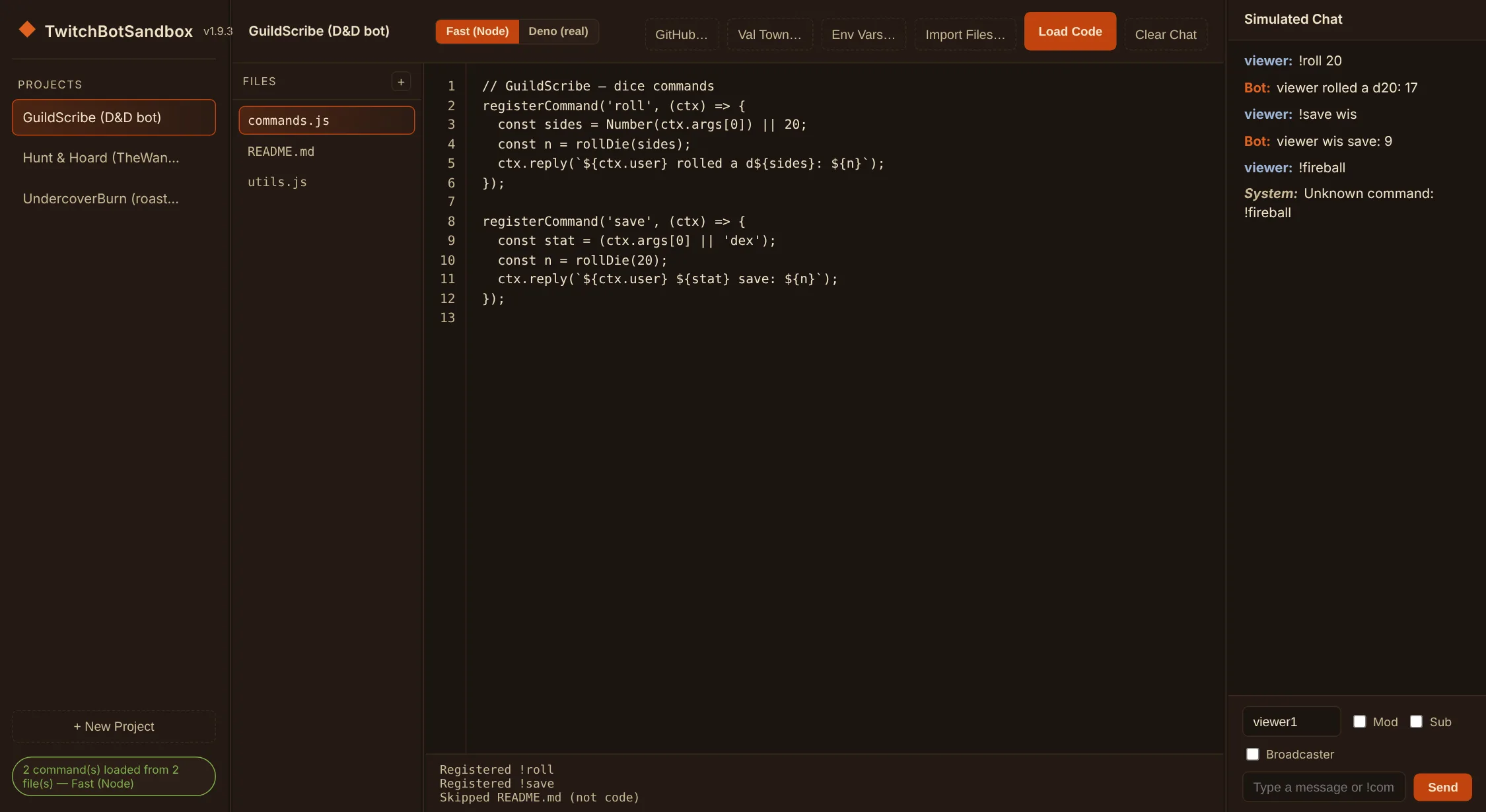
Testing a chat bot usually means going live, typing commands into your own chat and hoping nothing embarrassing comes out. Every tweak means another deploy and another round of typing.
TwitchBotSandbox moves that to the desktop. Write the command, click Load Code, and type into a fake chat that answers back straight away. Flip on Mod, Sub or Broadcaster to see how the bot treats different viewers. When it works, push it to GitHub or Val Town from the same window.
⚡ Fast (Node) FULLY OFFLINE
Instant and safe, for quick ideas.
- Runs right inside the app, no waiting
- Every file shares one scope, so no imports needed
- TypeScript is stripped on the fly
- No network or file access at all
🦕 Deno (real) REAL ACCESS
The real thing, for real bots.
- A bundled
denoruns your files as a real process - Real ES modules, native TypeScript, top-level
await - Real
Deno.*,fetchandWebSocket - Remote imports, such as Val Town's std library
Deno mode really does reach the network, so only run code you trust in it.
Simulated chat
Type messages and !commands as any username, with Mod, Sub and Broadcaster toggles.
Real Val Town bots
Drop in a webhook-style main.ts and it's fed properly signed Twitch EventSub messages. Its chat replies land back in the sandbox.
Local SQLite
Val Town's std/sqlite is redirected to a local database, so bot data persists between runs without touching production.
Multi-file projects
As many projects and files as you like, with a file explorer, imports from disk and line numbers.
GitHub & Val Town sync
Download a project from a repo or val, or upload your changes back as a commit.
Encrypted secrets
Per-project env vars and saved tokens are encrypted by Windows, never stored in plain text.
Commands use one simple call. Write this, click Load Code, then type !roll 20 in the chat.
registerCommand('roll', (ctx) => {
  const sides = Number(ctx.args[0]) || 20;
  const result = Math.floor(Math.random() * sides) + 1;
  ctx.reply(`${ctx.user} rolled a d${sides}: ${result}`);
});
ctx carries the user, the arguments and the Mod/Sub/Broadcaster flags. postSystemLine() posts an unprompted bot line, for things like timers.
Can I try it without installing anything?
Yes. The live sandbox is the same app running in your browser. It has projects, files, Fast mode, Deno mode, the simulated chat and GitHub and Val Town sync. In the browser, Deno mode runs your files as real ES modules in a worker with a stand-in Deno global, keeps std/sqlite in your browser, and loads npm: and jsr: imports from esm.sh. A few things still need the desktop app's real deno process: node: built-ins, files that import each other in a loop, and requests to sites that block web pages (CORS). Projects are saved in your browser, or sign in with Google to keep them in your own account with automatic backups.
Can I download it?
Not yet. The desktop app is a personal tool for building my own bots for now. Keep an eye on this page.
Does it ever connect to my Twitch channel?
No. Nothing you type is sent to Twitch. When a real Val Town bot runs in Deno mode, the sandbox catches Twitch's chat-send and app-token calls and keeps them local. Any other web requests the bot makes go out for real.
Do I need Node or Deno installed?
No. The installer bundles both, so it runs on a plain Windows PC.
What bots has it been used for?
The bots behind this tavern, like GuildScribe and Hunt & Hoard.
New features get built and tested live on stream. Come watch the bots get made.